Publicado en AI Tools, Content Creation, Digital Marketing, Online Business, Video Marketing

InVideo Review: Is This AI Video Tool Worth It for Creators, Marketers, and Small Businesses?

By Marvin Gandis

Video is no longer optional for many businesses, creators, and marketers. It helps explain faster, hold attention longer, and make ideas feel more real. The problem is that video creation has traditionally felt too slow, too technical, or too expensive for many people.

That is where tools like InVideo enter the conversation.

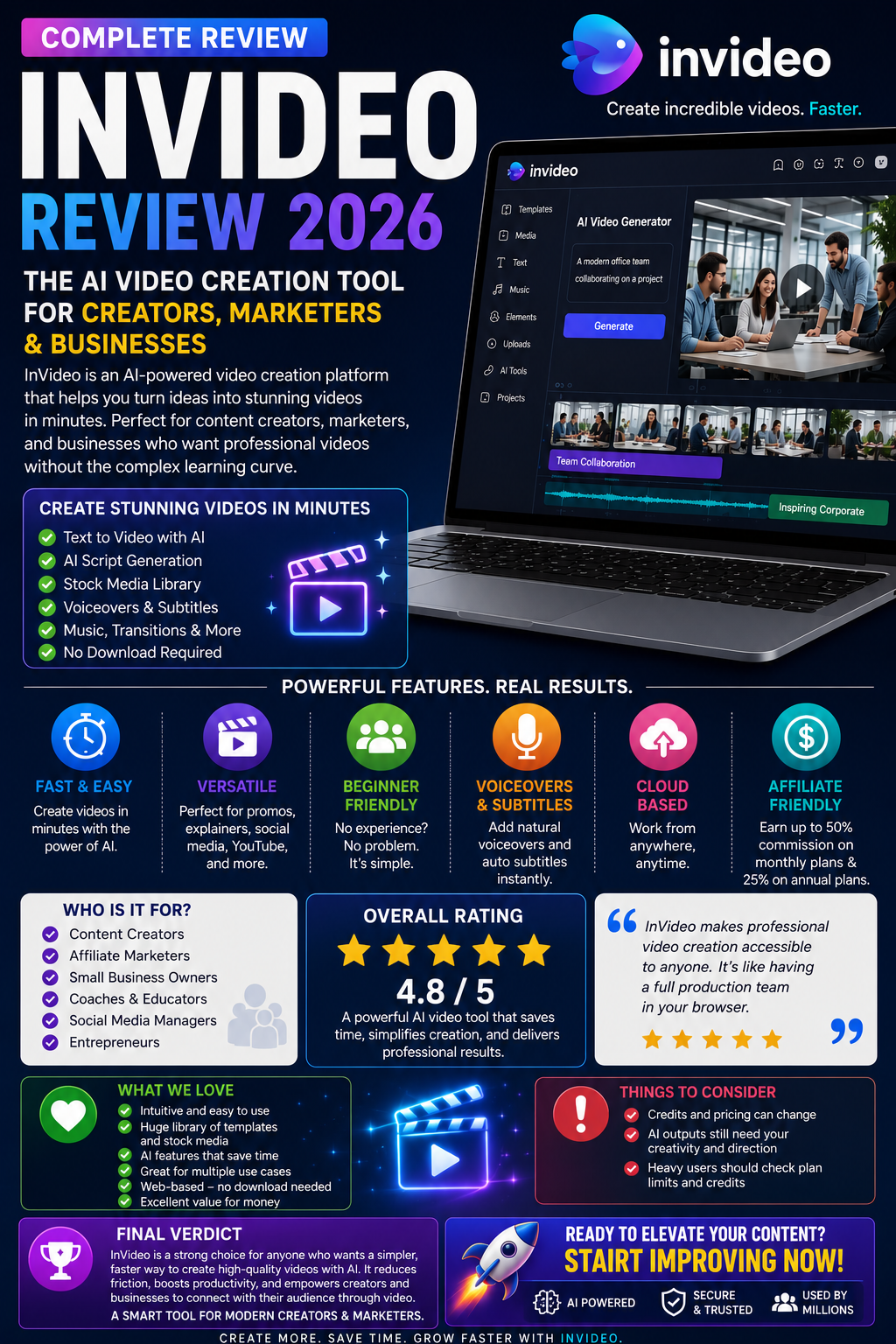
InVideo presents itself as an AI video platform that lets users turn prompts into videos, generate scripts, add subtitles, music, transitions, and voiceovers, and work directly from the browser instead of requiring software downloads. It also says beginners and experts can use it, which makes it especially appealing to people who want visual content without a steep editing learning curve.

So, is InVideo actually worth considering?

This review takes a practical look at what it offers, who it may help, where it stands out, and what readers should keep in mind before signing up.

What InVideo Is

InVideo is an AI-powered video creation tool designed to help users create videos from text prompts and guided workflows. According to its official pages, the platform can generate scripts, pull from large stock libraries, add voiceovers, subtitles, music, and transitions, and support different content formats such as promo videos, explainer videos, social clips, and marketing content. It also highlights newer model integrations and access to multiple media-generation tools inside paid plans.

That means the platform is not trying to be just a basic editor. It is trying to act more like a production assistant for people who want to move from idea to finished content faster.

What Makes InVideo Attractive

One of the most appealing things about InVideo is accessibility.

The company says the platform is web-based, beginner-friendly, and built to reduce the friction involved in traditional editing. For users who do not want to learn advanced timelines, complex effects, or heavy editing software, that matters.

A second advantage is versatility. InVideo promotes use cases including promo videos, explainer videos, marketing clips, social content, YouTube Shorts, image-to-video workflows, AI avatars, product videos, and more. That makes it attractive to several audiences rather than just one niche.

A third advantage is speed. The platform is clearly built around the idea of shortening production time. If someone regularly needs content for offers, social media, affiliate promotions, education, or business messaging, that speed can become a meaningful advantage.

Who InVideo May Be Best For

InVideo may be worth considering for:

  • Creators who want faster video production
  • Affiliate Marketers who need promo content
  • Small Business owners who want more visual marketing
  • Coaches and educators creating simple explainer videos
  • Social Media Marketers are producing short clips
  • Entrepreneurs who want a web-based AI workflow rather than traditional editing software

Its official positioning also includes people who want to make money online with videos and those who want marketing-focused AI content creation, which suggests the platform is leaning strongly into business and creator use cases rather than pure hobby editing.

Main Strengths

1. Beginner-friendly workflow

InVideo explicitly says beginners can use the platform and that no download is required because it is browser-based. That lowers the barrier for users who feel intimidated by standard editing tools.

2. Prompt-to-video approach

The appeal of AI video tools often comes down to speed and convenience. InVideo says users can start with prompts and let the platform generate scripts, visuals, voiceovers, and more. For people who struggle with starting from a blank screen, that can be a real advantage.

3. Broad range of use cases

The platform promotes marketing videos, educational content, short-form social clips, product videos, and more. This gives users more ways to justify the subscription if they plan to reuse the tool across different campaigns or content types.

4. Affiliate appeal

For marketers, InVideo’s affiliate program is notable. Its official affiliate materials and help center say affiliates can earn 50% on monthly plans and 25% on annual plans, which can make it attractive as both a tool and a monetization offer.

Things to Consider Before Signing Up

No review is complete without looking at the limitations.

First, pricing and credits can change. InVideo’s official pricing page shows that paid plans include model access, stock access, and credits, and it specifically notes that model and agent prices are subject to change. That means readers should always verify the current plan details before making long-term assumptions.

Second, AI tools are not magic. They may speed up production, but they do not automatically replace judgment, brand voice, good prompting, or marketing strategy. A weak message will still be weak, even if the video looks better.

Third, the more advanced a user’s production needs become, the more important it is to confirm whether the available credits, models, and workflows truly fit that level of output. In other words, readers should evaluate not just the promise of convenience, but whether the plan structure matches how often they intend to create.

Pricing Snapshot

At the time of review, InVideo’s main site displays plan tiers such as Plus, Max, and Generative, while the pricing page also notes access to 200+ image, video, audio, and music models in paid plans, along with stock providers and on-demand top-ups. The homepage currently shows example annual billing prices such as Plus at $17, Max at $85, and Generative at $170, though readers should verify the latest billing terms and monthly equivalents directly before purchasing.

Final Verdict

InVideo looks like a strong option for people who want a simpler and faster way to create video content with AI.

Its biggest appeal is not that it replaces creativity. Its biggest appeal is that it reduces friction. It gives beginners, marketers, creators, and business owners a more practical way to move from idea to video without the usual level of editing complexity.

That does not mean it is perfect for everyone. People who want highly manual, deeply customized, traditional editing workflows may still prefer other tools. But for readers who want convenience, speed, web-based access, and multiple AI-assisted content options, InVideo is absolutely worth a closer look.

Best For

Best for creators, marketers, entrepreneurs, and small businesses that want faster AI-assisted video creation without a heavy learning curve.

Reader Recommendation

If your goal is to create promotional videos, educational clips, social media content, or business visuals more efficiently, InVideo is a tool worth exploring.


Affiliate Disclosure

This article contains an affiliate link. If you purchase through that link, a commission may be earned at no additional cost to you.

Disclaimer

This article is for informational and educational purposes only. Product features, pricing, credits, commission terms, and platform availability may change over time. Always review the official website before making a purchase decision.
Publicado en AI Business, AI Tools, Automation Technology

The Best AI Tools to Start Your Automation Business — Free & Paid Options for Beginners

ARTICLE 4

Introduction

Tools don’t make you successful — the right tools do.

Most beginners get stuck because they don’t know which tools to use, where to start, or how complicated everything needs to be.

Good news:


You only need a small, simple toolbox to begin creating powerful automations that businesses will pay for.

This article breaks down the essential AI tools—free and paid—that beginners can use to build chatbots, automate tasks, generate content, manage leads, and deliver profitable AI solutions.

Let’s simplify your path to $ 5,000–$ 7,000/month.


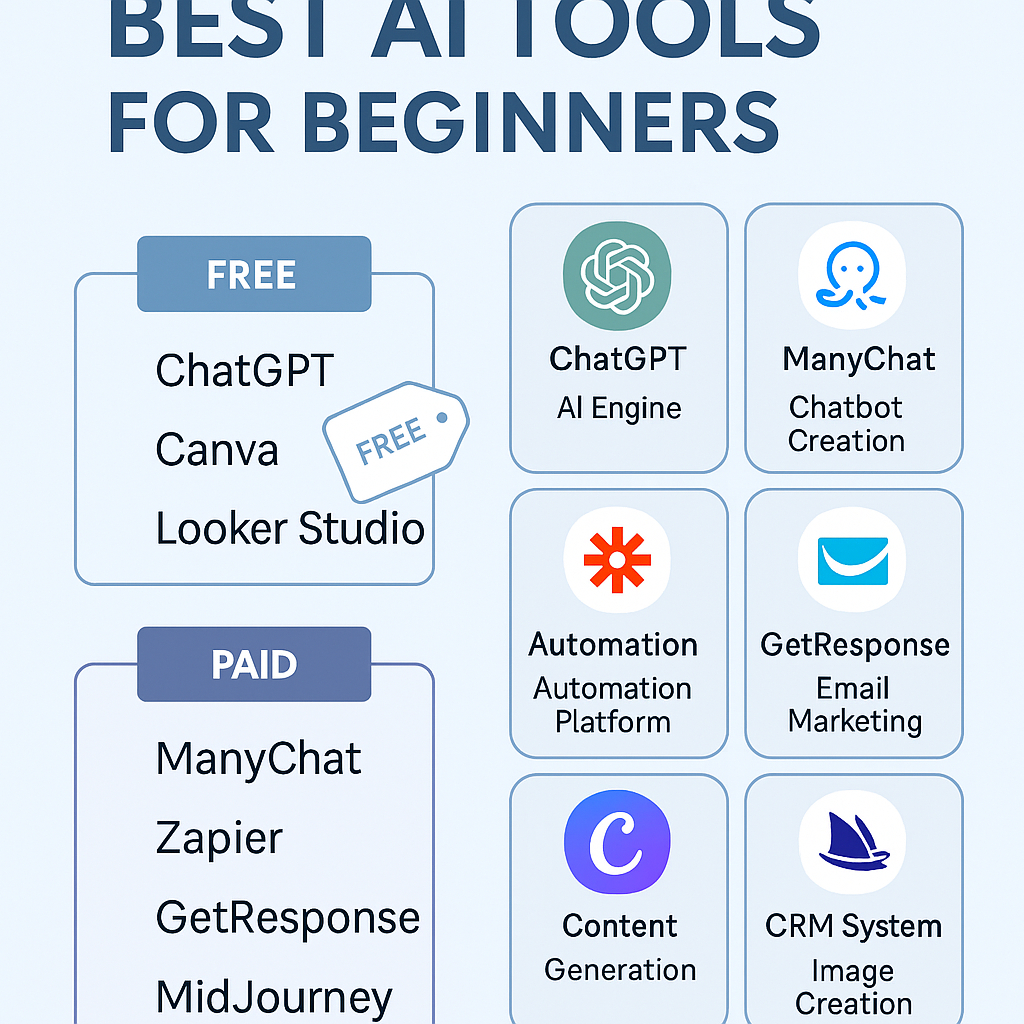
🤖 1. ChatGPT (OpenAI) — Your Main AI Engine

Why you need it:

ChatGPT is the core tool for:

  • Writing content
  • Creating automations
  • Building chatbot workflows
  • Crafting sales scripts
  • Brainstorming client solutions
  • Writing emails
  • Interpreting data

Free or paid?

  • The free version works for basic tasks
  • Paid version offers faster, smarter responses and advanced features

How it helps your business:

It becomes your assistant, strategist, copywriter, researcher, and automation brain—24/7.


💬 2. Bot Builders (No Coding Required)

To build AI chatbots for businesses, use these simple builders:

Recommended tools:

  • ManyChat — Great for Messenger, IG, WhatsApp
  • Tidio — Perfect for websites
  • Botpress — More advanced but powerful
  • Chatbase — Train a bot on any document or website

What you can build:

  • FAQ bots
  • Lead capture bots
  • Appointment bots
  • Product recommendation bots

Why businesses love them:

Bots reduce support time and convert more leads.


⚙️ 3. Automation Platforms (Make & Zapier)

These tools let you automate tasks between apps:

Examples:

  • New lead → send email
  • Customer message → chatbot response
  • Form submitted → add to CRM
  • Appointment booked → send confirmation + reminder

Tools:

  • Zapier (Beginner-friendly)
  • Make (More advanced, cheaper, more powerful)

These are required to connect all your tools into a smooth, automated system.


📧 4. Email Marketing Tools (GetResponse, MailerLite, AWeber)

If you want to sell automated email sequences:

Tools:

  • GetResponse (highly recommended)
  • MailerLite
  • AWeber
  • ActiveCampaign

Use them for:

  • Welcome sequences
  • Lead nurturing
  • Abandoned carts
  • Promotions
  • Follow-ups

Why it matters:

Email is still the highest ROI marketing channel.


🗂️ 5. CRM Systems (Client & Lead Management)

Businesses need better organization.


You can automate sales pipelines using:

  • GoHighLevel (GHL)
  • HubSpot (free)
  • Pipedrive

What you can automate:

  • Lead tracking
  • Follow-ups
  • Appointment reminders
  • Sales workflows

A CRM is the backbone of sales automation.


🎨 6. AI Content & Design Tools

Perfect for social media, blogs, websites, and marketing.

Tools you can use:

  • Canva (AI image generator + design editor)
  • ChatGPT for text content
  • MidJourney / DALL·E for images
  • InVideo / Canva Video for video creation

What you can produce:

  • Social posts
  • Carousels
  • Scripts
  • Ads
  • Thumbnails
  • Flyers
  • Short videos

This is one of the easiest services to sell.


🛒 7. E-Commerce AI Tools

Great for online stores.

Tools:

  • Shopify AI
  • AutoDS AI features
  • Tidio AI
  • ChatGPT product writing

Automations you can offer:

  • Smart customer responses
  • Product description generation
  • Upsell suggestions
  • Cart recovery messages

E-commerce is a goldmine for automation.


📊 8. Data Tools (Insights Without Being a Data Scientist)

You don’t need advanced math.

Tools:

  • ChatGPT with data upload
  • Google Sheets + AI add-ons
  • Looker Studio

Use them to create:

  • Performance reports
  • Trends
  • Business insights
  • Recommendations

Businesses love data explained simply.


🚀 Conclusion

You don’t need 20 tools.


You need a small toolbox + consistent action.

The tools in this article give you everything you need to build:

  • Chatbots
  • Sales automations
  • Marketing systems
  • Content engines
  • Analytics reports

This is how you start and scale your AI automation business quickly.

In the next article, we will guide you through building your first real automation step by step.


⚠️ Disclaimer :

This article is for educational purposes only. Tool performance and availability may change over time.

Publicado en AI Tools, E-commerce, Shopify Growth

🚀 Transform Your Shopify Store with AI: The Future of Sales & Customer Support

Why Human-Only Support Is Costing You Sales

Every Shopify store owner knows the pain:

  • Visitors come and go without buying.
  • Support tickets accumulate for simple requests, such as order tracking or returns.
  • Live chat agents can’t cover 24/7 without burning through payroll.

Today, AI isn’t just a chatbot—it’s becoming a sales-driving machine that converts browsers into buyers while cutting your support costs. And one tool is leading the way: HelloRep AI – The Sales Concierge Built for Shopify.


🤖 What Is HelloRep AI?

HelloRep AI is an AI-powered sales and support assistant designed specifically for Shopify and Shopify Plus merchants. Unlike traditional chatbots, it focuses on conversions, upsells, and genuine customer experiences, rather than just answering questions.

Here’s what makes it stand out:

  • ✅ Converts Visitors into Buyers: AI engages proactively, offering the right product recommendations at the right time.
  • ✅ Handles Post-Purchase Tasks: Customers can track orders, request cancellations, and manage returns without waiting for a human.
  • ✅ Lets You Jump In Live: Got a VIP customer on the line? Instantly join the chat to close a high-value sale.
  • ✅ Learns From Every Conversation: Your AI gets smarter, giving you insights into what shoppers want.

📊 Why Shopify Brands Are Switching to AI Concierges

Modern shoppers expect instant answers, smooth transactions, and 24/7 support. If you’re only relying on human staff, you’re leaving money on the table.

  • 💰 Increase Conversion Rates (CVR): AI keeps visitors engaged, helping reduce cart abandonment.
  • 📈 Boost Average Order Value (AOV): Personalized upsells and product bundles delivered in-chat.
  • ⏳ Save Hours: Reduce repetitive support tickets by automating FAQs, returns, and tracking.
  • 🔍 Gain Shopper Intelligence: Understand what products your audience asks for most—improve your store strategy with data-driven decisions.

🎯 Start Risk-Free – No Big Upfront Investment

With HelloRep AI, you can:

  • Try it FREE for 30 days – no risk, no commitment.
  • Start as low as $12 per 1,000 visitors with Pay-As-You-Grow pricing.
  • Give your shoppers a better experience while spending less on support.

And because you’re reading this through my referral, you’ll also unlock a special 10% discount on your plan – plus I’ll earn a 20% commission for sharing this powerful tool with you. It’s a win-win.


🚀 Take Action: Your Competitors Won’t Wait

The future of e-commerce belongs to brands that adapt fast. AI sales concierges aren’t a “maybe” anymore—they’re a must-have to stay competitive.

👉 Click here to activate your free 30-day trial of HelloRep AI

Start converting more visitors, reducing ticket volume, and growing your sales with the power of AI.


⚠️ Disclaimer

I’m an affiliate partner with HelloRep AI. If you sign up through my link, I may earn a commission at no extra cost to you. This helps me share tools and resources that support your online business growth.