By Marvin Gandis
Video is no longer optional for many businesses, creators, and marketers. It helps explain faster, hold attention longer, and make ideas feel more real. The problem is that video creation has traditionally felt too slow, too technical, or too expensive for many people.
That is where tools like InVideo enter the conversation.
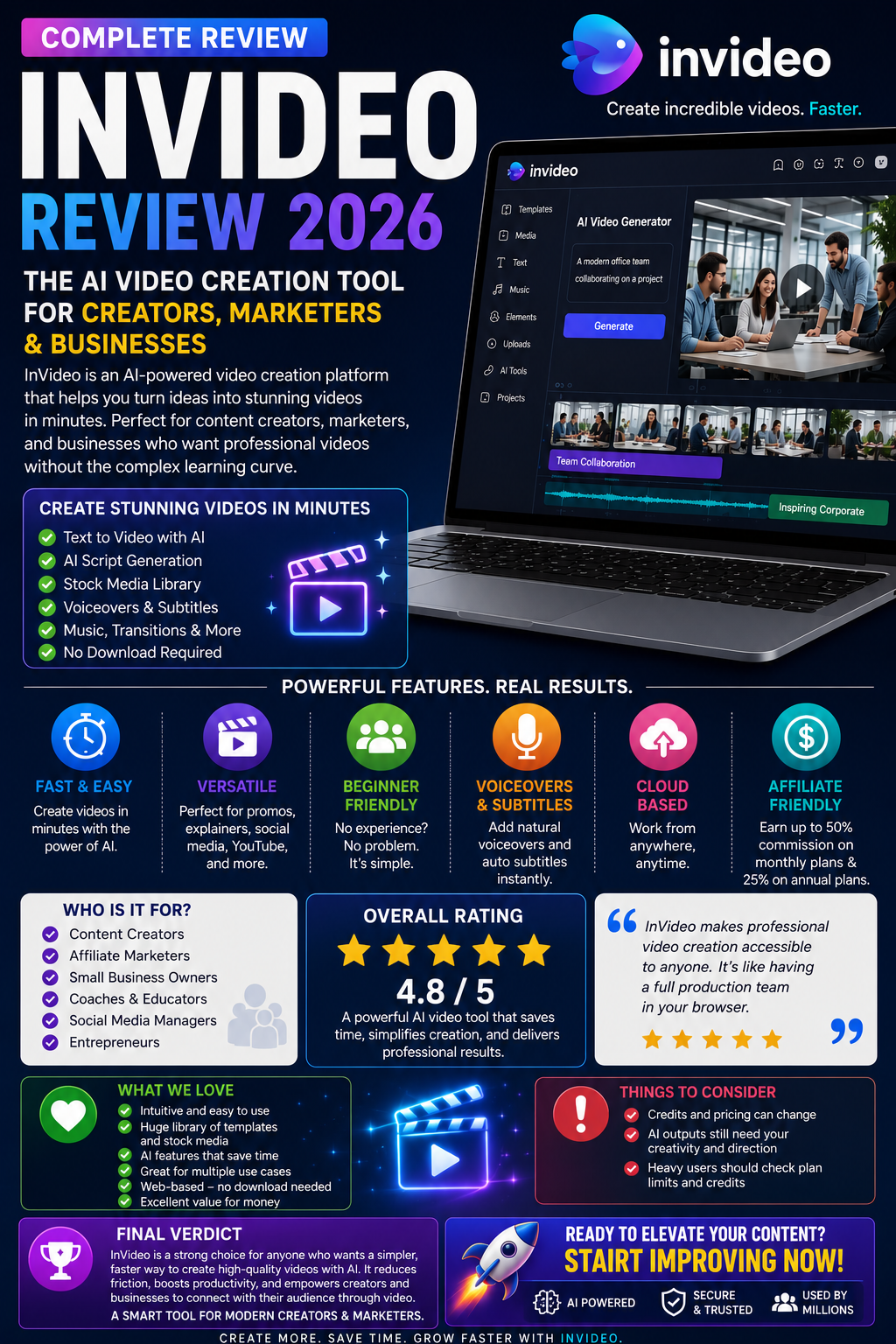
InVideo presents itself as an AI video platform that lets users turn prompts into videos, generate scripts, add subtitles, music, transitions, and voiceovers, and work directly from the browser instead of requiring software downloads. It also says beginners and experts can use it, which makes it especially appealing to people who want visual content without a steep editing learning curve.
So, is InVideo actually worth considering?
This review takes a practical look at what it offers, who it may help, where it stands out, and what readers should keep in mind before signing up.
What InVideo Is
InVideo is an AI-powered video creation tool designed to help users create videos from text prompts and guided workflows. According to its official pages, the platform can generate scripts, pull from large stock libraries, add voiceovers, subtitles, music, and transitions, and support different content formats such as promo videos, explainer videos, social clips, and marketing content. It also highlights newer model integrations and access to multiple media-generation tools inside paid plans.
That means the platform is not trying to be just a basic editor. It is trying to act more like a production assistant for people who want to move from idea to finished content faster.
What Makes InVideo Attractive
One of the most appealing things about InVideo is accessibility.
The company says the platform is web-based, beginner-friendly, and built to reduce the friction involved in traditional editing. For users who do not want to learn advanced timelines, complex effects, or heavy editing software, that matters.
A second advantage is versatility. InVideo promotes use cases including promo videos, explainer videos, marketing clips, social content, YouTube Shorts, image-to-video workflows, AI avatars, product videos, and more. That makes it attractive to several audiences rather than just one niche.
A third advantage is speed. The platform is clearly built around the idea of shortening production time. If someone regularly needs content for offers, social media, affiliate promotions, education, or business messaging, that speed can become a meaningful advantage.
Who InVideo May Be Best For
InVideo may be worth considering for:
- Creators who want faster video production
- Affiliate Marketers who need promo content
- Small Business owners who want more visual marketing
- Coaches and educators creating simple explainer videos
- Social Media Marketers are producing short clips
- Entrepreneurs who want a web-based AI workflow rather than traditional editing software
Its official positioning also includes people who want to make money online with videos and those who want marketing-focused AI content creation, which suggests the platform is leaning strongly into business and creator use cases rather than pure hobby editing.
Main Strengths
1. Beginner-friendly workflow
InVideo explicitly says beginners can use the platform and that no download is required because it is browser-based. That lowers the barrier for users who feel intimidated by standard editing tools.
2. Prompt-to-video approach
The appeal of AI video tools often comes down to speed and convenience. InVideo says users can start with prompts and let the platform generate scripts, visuals, voiceovers, and more. For people who struggle with starting from a blank screen, that can be a real advantage.
3. Broad range of use cases
The platform promotes marketing videos, educational content, short-form social clips, product videos, and more. This gives users more ways to justify the subscription if they plan to reuse the tool across different campaigns or content types.
4. Affiliate appeal
For marketers, InVideo’s affiliate program is notable. Its official affiliate materials and help center say affiliates can earn 50% on monthly plans and 25% on annual plans, which can make it attractive as both a tool and a monetization offer.
Things to Consider Before Signing Up
No review is complete without looking at the limitations.
First, pricing and credits can change. InVideo’s official pricing page shows that paid plans include model access, stock access, and credits, and it specifically notes that model and agent prices are subject to change. That means readers should always verify the current plan details before making long-term assumptions.
Second, AI tools are not magic. They may speed up production, but they do not automatically replace judgment, brand voice, good prompting, or marketing strategy. A weak message will still be weak, even if the video looks better.
Third, the more advanced a user’s production needs become, the more important it is to confirm whether the available credits, models, and workflows truly fit that level of output. In other words, readers should evaluate not just the promise of convenience, but whether the plan structure matches how often they intend to create.
Pricing Snapshot
At the time of review, InVideo’s main site displays plan tiers such as Plus, Max, and Generative, while the pricing page also notes access to 200+ image, video, audio, and music models in paid plans, along with stock providers and on-demand top-ups. The homepage currently shows example annual billing prices such as Plus at $17, Max at $85, and Generative at $170, though readers should verify the latest billing terms and monthly equivalents directly before purchasing.
Final Verdict
InVideo looks like a strong option for people who want a simpler and faster way to create video content with AI.
Its biggest appeal is not that it replaces creativity. Its biggest appeal is that it reduces friction. It gives beginners, marketers, creators, and business owners a more practical way to move from idea to video without the usual level of editing complexity.
That does not mean it is perfect for everyone. People who want highly manual, deeply customized, traditional editing workflows may still prefer other tools. But for readers who want convenience, speed, web-based access, and multiple AI-assisted content options, InVideo is absolutely worth a closer look.
Best For
Best for creators, marketers, entrepreneurs, and small businesses that want faster AI-assisted video creation without a heavy learning curve.
Reader Recommendation
If your goal is to create promotional videos, educational clips, social media content, or business visuals more efficiently, InVideo is a tool worth exploring.
Affiliate Disclosure
This article contains an affiliate link. If you purchase through that link, a commission may be earned at no additional cost to you.
Disclaimer
This article is for informational and educational purposes only. Product features, pricing, credits, commission terms, and platform availability may change over time. Always review the official website before making a purchase decision.
Debe estar conectado para enviar un comentario.